Vehicle Categories Prediction
This solution automatically detects and classifies vehicles into specific operational categories from vehicle images, enabling detailed fleet and service vehicle characterization. It can recognize vehicles such as delivery trucks and vans from Amazon, DHL, FedEx, UPS, and USPS, as well as emergency and public service vehicles like fire trucks, police cars, and school buses. Designed to integrate seamlessly with Snapshot, this solution enhances vehicle analysis with precise category detection. The typical usage is as follows:
- Do a lookup on a full image using Snapshot.
- Use the result to crop the vehicle and save that image.
- Send the cropped image to
vehicle-categories(see below).
Running the Docker Image
- Ask us for the ENCRYPTION_KEY. Contact us.
- Install Docker if you do not have it.
- Then run the following Docker command to start the server.
- Note: pass
--gpus allto assign all GPUs to the Docker container. (Using--gpus alllets the Docker container access all GPUs, speeding up tasks like data processing by leveraging GPU power.) - In this example the server port is set to
8501.
- Note: pass
docker run -e KEY=ENCRYPTION_KEY -p 8501:8501 platerecognizer/vehicle-categories:latest
Vehicle Categories Lookup
The server expects a base64 encoded image of the vehicle only. In the examples below, we use /path/to/vehicle.png.
If you aren't using Snapshot to extract the vehicle, ensure /path/to/vehicle.png contains only one vehicle and is closely cropped. Passing an image with multiple vehicles will return only a single prediction (not one per vehicle) and can therefore produce misleading or incomplete category classification.
If your image contains multiple vehicles, don't pass the full image directly to the model. Instead, run a vehicle detection step (for example using Snapshot) to get each vehicle's bounding box, crop each vehicle, and then send each cropped vehicle image individually to the model. See the "End-to-end Example" below for a complete sample that uses Snapshot to detect vehicles, crops them, and sends each crop to the vehicle-categories prediction.
Supported output classes:
- amazon
- dhl
- fedex
- fire_truck
- police
- school_bus
- ups
- usps
With cURL
curl -d "{\"instances\": [{ \"b64\":\"$(base64 -w0 /path/to/vehicle.png)\"}]}" \
    http://localhost:8501/v1/models/tfserve_model:predict
With Python
import requests
import base64
with open(r'/path/to/vehicle.png', 'rb') as fp:
    jpeg_bytes = base64.b64encode(fp.read()).decode('utf-8')
    predict_request = '{"instances" : [{"b64": "%s"}]}' % jpeg_bytes

    response = requests.post(
        'http://localhost:8501/v1/models/tfserve_model:predict',
        data=predict_request)
    response.raise_for_status()
print(response.json())
Result
The output shows the confidence scores for various vehicle-categories. Each score represents how likely the model believes the vehicle belongs to that category. In this example, "police" has a high confidence score of 0.91874, showing strong certainty in the classification, while all other categories have scores below 0.5, indicating low likelihood.
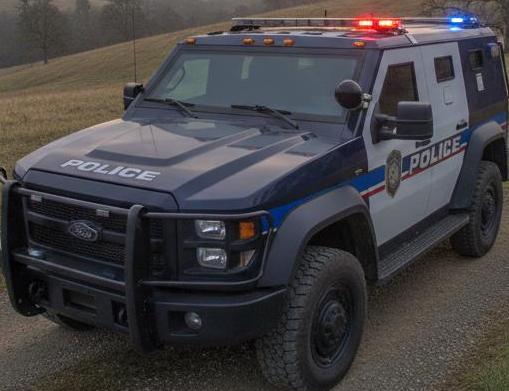
{
    "predictions": [
        {
            "score": [
                0.91874,
                0.01196,
                0.01194
            ],
            "labels": [
                "police",
                "usps",
                "dhl"
            ]
        }
    ]
}
In this second example, "school_bus" has the highest confidence score at 0.910999954, again indicating strong classification confidence, with the remaining categories scoring below 0.5.
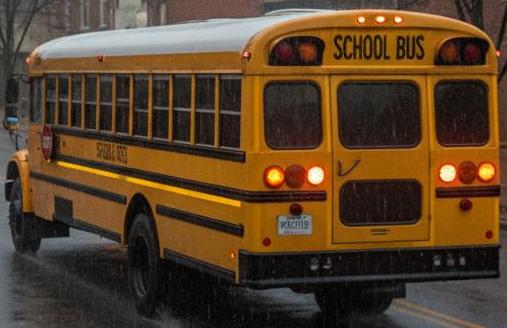
{
    "predictions": [
        {
            "labels": [
                "school_bus",
                "usps",
                "police"
            ],
            "score": [
                0.910999954,
                0.01297,
                0.01291
            ]
        }
    ]
}
End-to-end Example
import base64
import io

import requests
from PIL import Image

image_path = "car.jpg"
token = 'YOUR_API_TOKEN'  # Replace YOUR_API_TOKEN with your API TOKEN from https://app.platerecognizer.com/service/snapshot-cloud/
with open(image_path, 'rb') as fp:
    response = requests.post(
        'https://api.platerecognizer.com/v1/plate-reader/',
        files=dict(upload=fp),
        headers={'Authorization': f'Token {token}'},
    )
image = Image.open(image_path)
for result in response.json()['results']:
    xmin = result['vehicle']['box']['xmin']
    ymin = result['vehicle']['box']['ymin']
    xmax = result['vehicle']['box']['xmax']
    ymax = result['vehicle']['box']['ymax']
    im_bytes = io.BytesIO()
    image.crop((xmin, ymin, xmax, ymax)).save(im_bytes, 'JPEG', quality=95)
    im_bytes.seek(0)
    b64_data = base64.b64encode(im_bytes.read()).decode('utf-8')
    predict_request = '{"instances" : [{"b64": "%s"}]}' % b64_data
    response = requests.post(
        'http://localhost:8501/v1/models/tfserve_model:predict', data=predict_request
    )
    print(response.json())