Motorola Avigilon Cameras with ParkPow
This guide explains how to send plate reads from Motorola Solutions Avigilon L6A and L6Q ALPR cameras to ParkPow. Both models use the UTMC protocol, but they do not send the same data. The L6A sends the plate together with the vehicle Make, Model and Color (MMC), while the L6Q sends the plate only, so it uses the Avigilon Camera Middleware to add MMC. You can set up both cameras in a fully On-Premise setup, with MMC, so your data stays on your network.
| Section | Description |
|---|---|
| Choose Your Setup | Based on your cameras, you can choose to run ParkPow in our cloud or On-Premise in your environment. |
| Option A: Direct to ParkPow | Configure an L6A to send reads directly to ParkPow. |
| Option B: L6Q via Middleware | Add MMC to L6Q reads with the Avigilon Camera Middleware. |
| Snapshot | When Snapshot is used and which deployment applies. |
| ParkPow Cloud and On-Premise | Links to create a ParkPow Cloud account or install ParkPow On-Premise. |
| Limitations | Constraints to review before rollout. |
Choose Your Setup
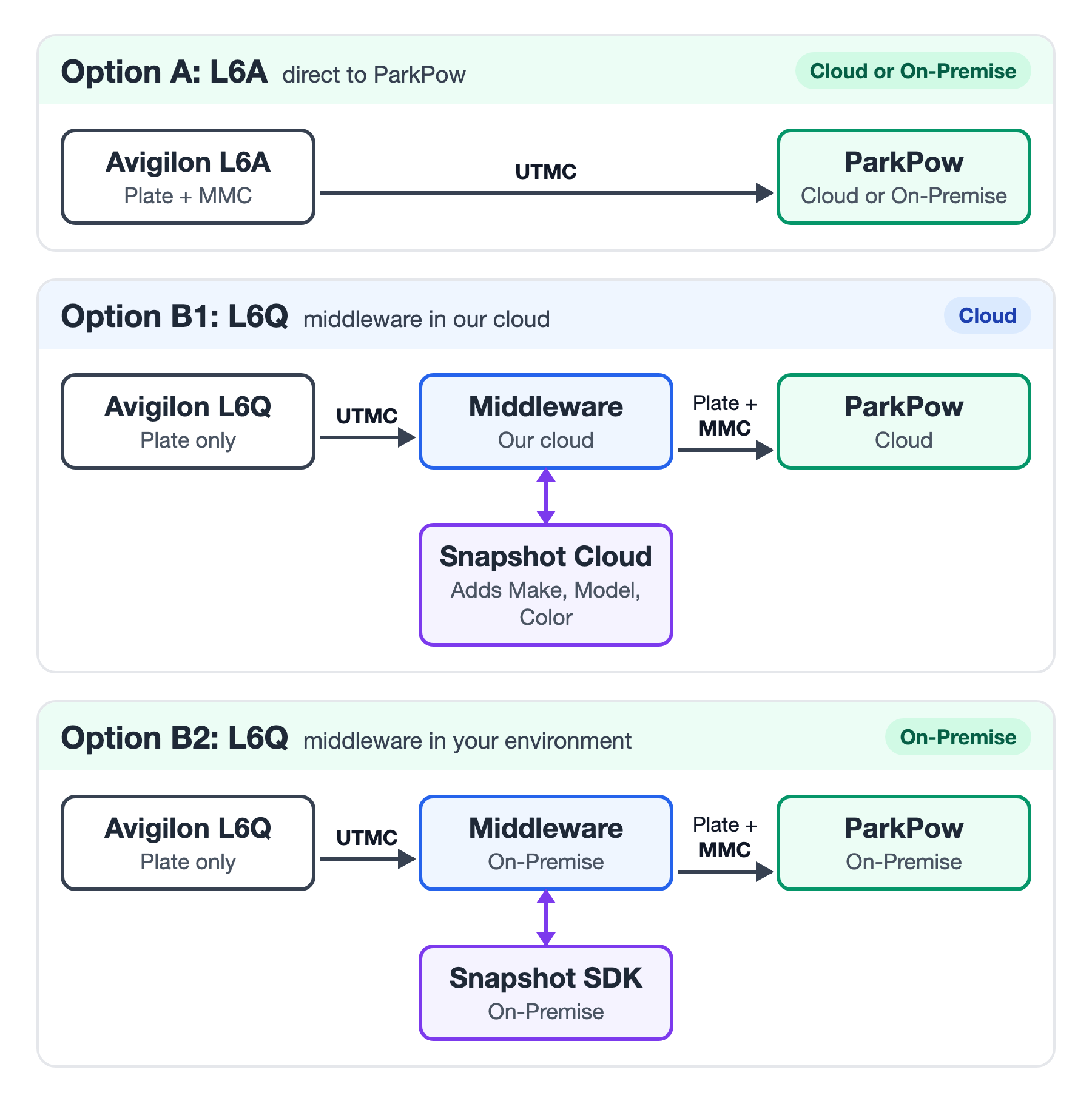
| Camera | Option | MMC in ParkPow | Snapshot | Middleware | ParkPow Cloud | ParkPow On-Premise |
|---|---|---|---|---|---|---|
| L6A | Option A: Direct | ✅ From camera | Not used | Not used | ✅ | ✅ |
| L6Q | Option B1: Middleware | ✅ From Snapshot | Snapshot Cloud | Our cloud | ✅ | ❌ |
| L6Q | Option B2: Middleware | ✅ From Snapshot | Snapshot SDK | On-Premise | ✅ | ✅ |
For privacy-sensitive deployments, such as those subject to GDPR, we recommend that you:
- Choose a fully On-Premise setup: Option A with ParkPow On-Premise, or Option B2 with the Avigilon Camera Middleware, Snapshot SDK and ParkPow On-Premise.
- Do not use Option B1.
For Option B1 and Option B2, contact us to get the Avigilon Camera Middleware.
Option A: Direct to ParkPow
Use this option for the L6A. The camera sends each plate read, with MMC, directly to ParkPow over UTMC, authenticated with your ParkPow API Token. No middleware or Snapshot is involved.
Requirements
- A ParkPow Cloud account or a ParkPow On-Premise server. See ParkPow Cloud and On-Premise.
- Your ParkPow API Token, available at app.parkpow.com/account/token/. On ParkPow On-Premise, open
/account/token/on your server. - Network access from the camera to ParkPow.
Configure the Camera
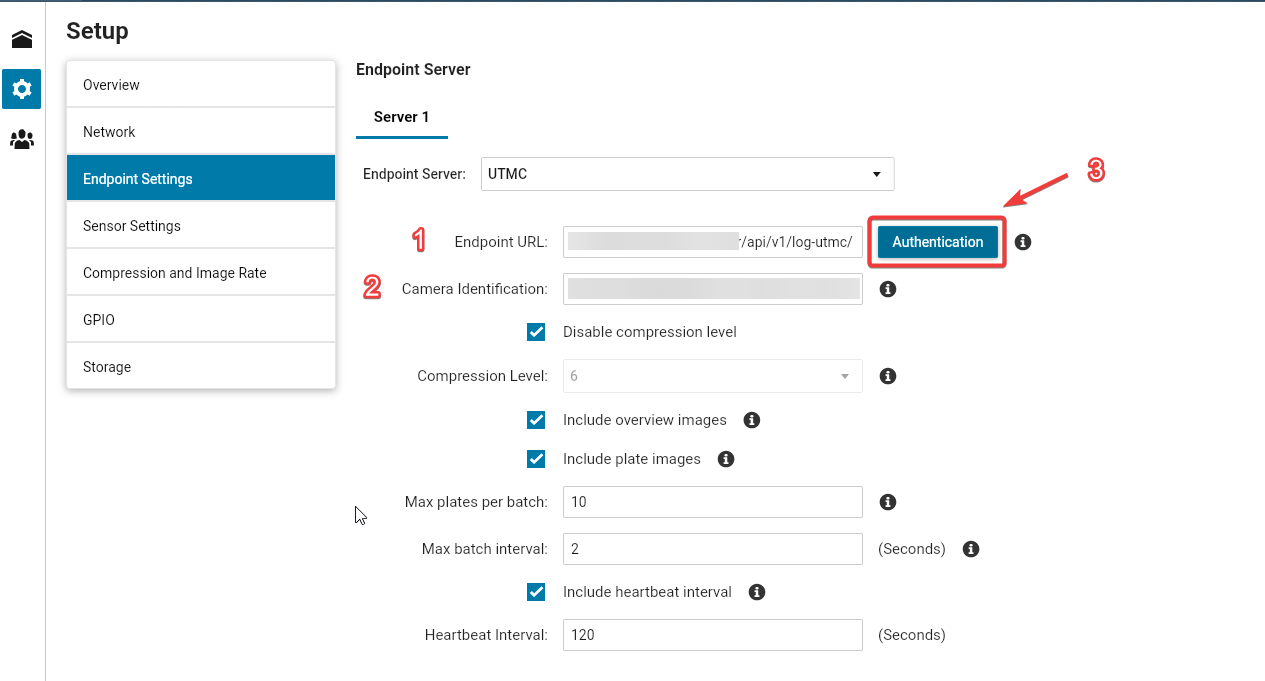
In the camera's web interface, open Setup > Endpoint Settings and select UTMC as the Endpoint Server.
Show screenshot
-
Set the Endpoint URL (item 1 in the screenshot).
For ParkPow Cloud:
https://app.parkpow.com/api/v1/log-utmc/For ParkPow On-Premise:
http://PARKPOW_ONPREM_IP_ADDRESS:8000/api/v1/log-utmc/Replace
PARKPOW_ONPREM_IP_ADDRESSwith the IP address of your ParkPow On-Premise server. -
Set the Camera Identification to a unique name, for example
Camera-Entrance-01(item 2). ParkPow uses this value as the camera name and creates the camera automatically on the first read. -
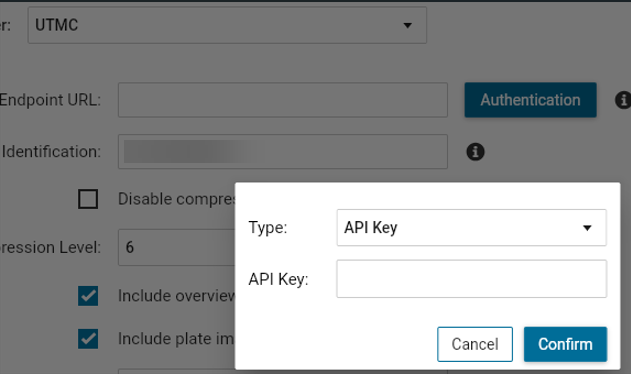
Click Authentication (item 3), select API Key, paste your ParkPow API Token, and click Confirm.
Show screenshot
 danger
Replace the API Key with your own ParkPow API Token. Never share it or commit it to source control.
-
Save the configuration.
For other camera settings and supported authentication headers, see the UTMC integration.
Option B: L6Q via Middleware
The L6Q does not send Make, Model or Color. To add MMC, the camera sends its reads to the Avigilon Camera Middleware instead of sending them to ParkPow. The middleware runs each read through Snapshot to get the MMC, then forwards the complete read to ParkPow.
The middleware is available in two ways:
| Option B1: Our cloud | Option B2: On-Premise | |
|---|---|---|
| Middleware runs on | Our cloud | Your server |
| Snapshot | Snapshot Cloud | Snapshot SDK on your network |
| ParkPow | ParkPow Cloud | ParkPow On-Premise or ParkPow Cloud |
| Data leaves your network | Yes | No, when used with ParkPow On-Premise |
Both options require an evaluation of your project by our team. Contact us before you plan a rollout with the middleware.
How the Middleware Works
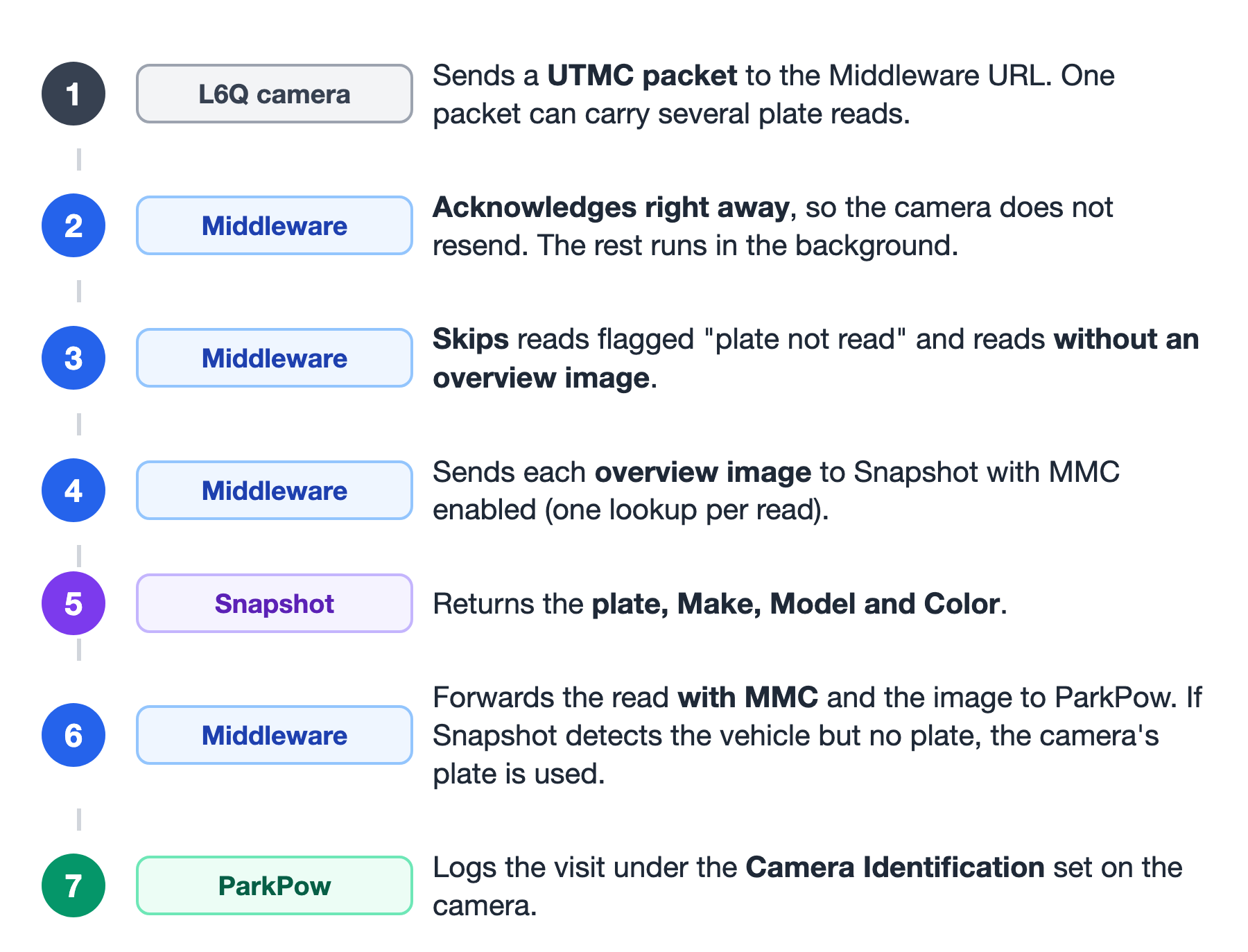
- The camera sends a UTMC packet to the Middleware URL. One packet can contain several plate reads.
- The middleware acknowledges the packet right away, so the camera does not resend it. Processing continues in the background.
- The middleware skips reads flagged as not read by the camera and reads without a matching overview image.
- For each remaining read, the middleware sends the overview image to Snapshot with MMC enabled: Snapshot Cloud in Option B1, or your Snapshot SDK in Option B2.
- Snapshot returns the plate, Make, Model and Color.
- The middleware forwards the read with MMC and the image to ParkPow. If Snapshot detects the vehicle but no plate, the camera's plate is used.
- ParkPow logs the visit under the Camera Identification set on the camera.
Middleware Options
By default, the middleware uses the Snapshot result for each read. For some data, the Middleware URL can be configured to use the camera's own value instead.
| Data | Default | Use the camera's value instead |
|---|---|---|
| Plate | From Snapshot. If Snapshot detects the vehicle but no plate, the camera's plate is used. | Always use the camera's plate and confidence: overwrite_plate=1 |
| Make, Model, Color | From Snapshot. | Not available. The L6Q does not send Make, Model or Color. |
| Orientation | Front or rear, from Snapshot. | towards as front and away as rear: overwrite_orientation=1 |
The middleware forwards a read to ParkPow only when Snapshot detects a vehicle in the overview image. If Snapshot detects no vehicle, the read is not sent to ParkPow, even if the camera reported a plate.
Request the Middleware
-
Contact us and tell us whether you prefer Option B1 (our cloud) or Option B2 (On-Premise).
-
Our team evaluates your project and replies with the next steps.
-
To set up the middleware:
- Option B1: we ask you for your ParkPow API Token and your Snapshot Cloud API Token, from app.platerecognizer.com/service/snapshot-cloud/. We deploy the middleware and send you your Middleware URL.
- Option B2: we provide the middleware and the instructions to run it on your server, connected to your Snapshot SDK and your ParkPow. Your Middleware URL is the address of that server on your network.
Never post your tokens publicly or commit them to source control. For Option B1, send them only when our team asks for them, through the support channel.
Avoid Duplicate Reads in ParkPow
The middleware already sends each read to ParkPow. If your Snapshot license also forwards its results to ParkPow through a webhook, ParkPow receives every read twice. Before you configure the camera, disable that forwarding:
- Option B1 (Snapshot Cloud): open Snapshot Cloud and disable the ParkPow webhook. With ParkPow Cloud, this webhook may be enabled by default.
- Option B2 (Snapshot SDK): open Snapshot SDK Webhooks and remove the ParkPow webhook from your license. Then restart the Snapshot SDK container for the change to take effect.
Configure the Camera
In the camera's web interface, open Setup > Endpoint Settings and select UTMC as the Endpoint Server. Use the same screen shown in Option A.
The camera must have a network route to the middleware and be allowed to open an HTTP(S) connection to the Middleware URL:
- Option B1: outbound HTTPS (TCP 443) from the camera to the internet, so it can reach the Middleware URL in our cloud.
- Option B2: the camera and the middleware server must be on the same network, or on routed networks (VLANs or subnets) that allow traffic from the camera to the middleware server's IP address and port.
Check that firewalls, VLAN rules and proxies between the camera and the middleware allow this traffic.
-
Set the Endpoint URL to your Middleware URL.
-
Set the Camera Identification to a unique name, for example
Camera-Entrance-01. ParkPow uses this value as the camera name and creates the camera automatically on the first read. -
Leave Authentication empty. Your tokens are configured in the middleware.
-
Save the configuration.
Verify the Integration
- Drive a vehicle past the camera.
- Open app.parkpow.com/vehicles/, or
/vehicles/on your ParkPow On-Premise server, and confirm that the read appears with Make, Model and Color. - If no reads arrive after a few minutes, check that:
- The Endpoint URL matches the Middleware URL exactly.
- Option B1: the camera can reach the internet.
- Option B2: the camera can reach the middleware server, and the middleware can reach your Snapshot SDK and ParkPow.
If each read appears twice in ParkPow, disable the Snapshot webhook to ParkPow. See Avoid Duplicate Reads in ParkPow.
If the problem continues, contact us with the Camera Identification and the time of the read.
Snapshot
Snapshot is the Plate Recognizer engine that reads the overview image and returns the plate and the vehicle MMC.
| Setup | Snapshot |
|---|---|
| Option A | Not used. The L6A sends its own MMC to ParkPow. |
| Option B1 | Snapshot Cloud. Sign up at app.platerecognizer.com/service/snapshot-cloud/. |
| Option B2 | Snapshot SDK installed on your network. See Snapshot SDK installation. |
In both Option B1 and Option B2, each plate read uses one Snapshot lookup. A single UTMC packet can contain several plate reads, so one packet can use several lookups.
ParkPow Cloud and On-Premise
| Deployment | Use with | Get started |
|---|---|---|
| ParkPow Cloud | Option A, B1 or B2 | Sign up at app.parkpow.com. See Getting Started. |
| ParkPow On-Premise | Option A or B2 | Follow the On-Premise Setup Guide and check the System Requirements. |
Limitations
- Option B1 uses cloud services. Plate reads and overview images pass through the middleware in our cloud and Snapshot Cloud, and are stored in ParkPow Cloud. To keep your data on your network, use Option B2 with ParkPow On-Premise.
- The middleware requires a project evaluation. It is provided by our team after evaluating your project, either in our cloud (Option B1) or to run On-Premise (Option B2). Contact us to get started.
- The Snapshot SDK must stay on your internal network. It has no built-in authentication, so it is supported only with Option B2.
- Snapshot usage is counted per plate read, not per UTMC packet. The L6Q can send several plate reads in a single UTMC packet. The middleware sends each plate read to Snapshot separately, so each one uses one Snapshot lookup. For example, a packet with 3 plate reads uses 3 Snapshot lookups.
Summary
- L6A: connect it directly to ParkPow Cloud or ParkPow On-Premise (Option A). MMC comes from the camera.
- L6Q: use the Avigilon Camera Middleware to add MMC. Run it On-Premise with Snapshot SDK (Option B2), or in our cloud with Snapshot Cloud and ParkPow Cloud (Option B1).
- For GDPR and other privacy-sensitive deployments, use a fully On-Premise setup: Option A or Option B2 with ParkPow On-Premise.
- Keep your tokens confidential.